Edge takeover
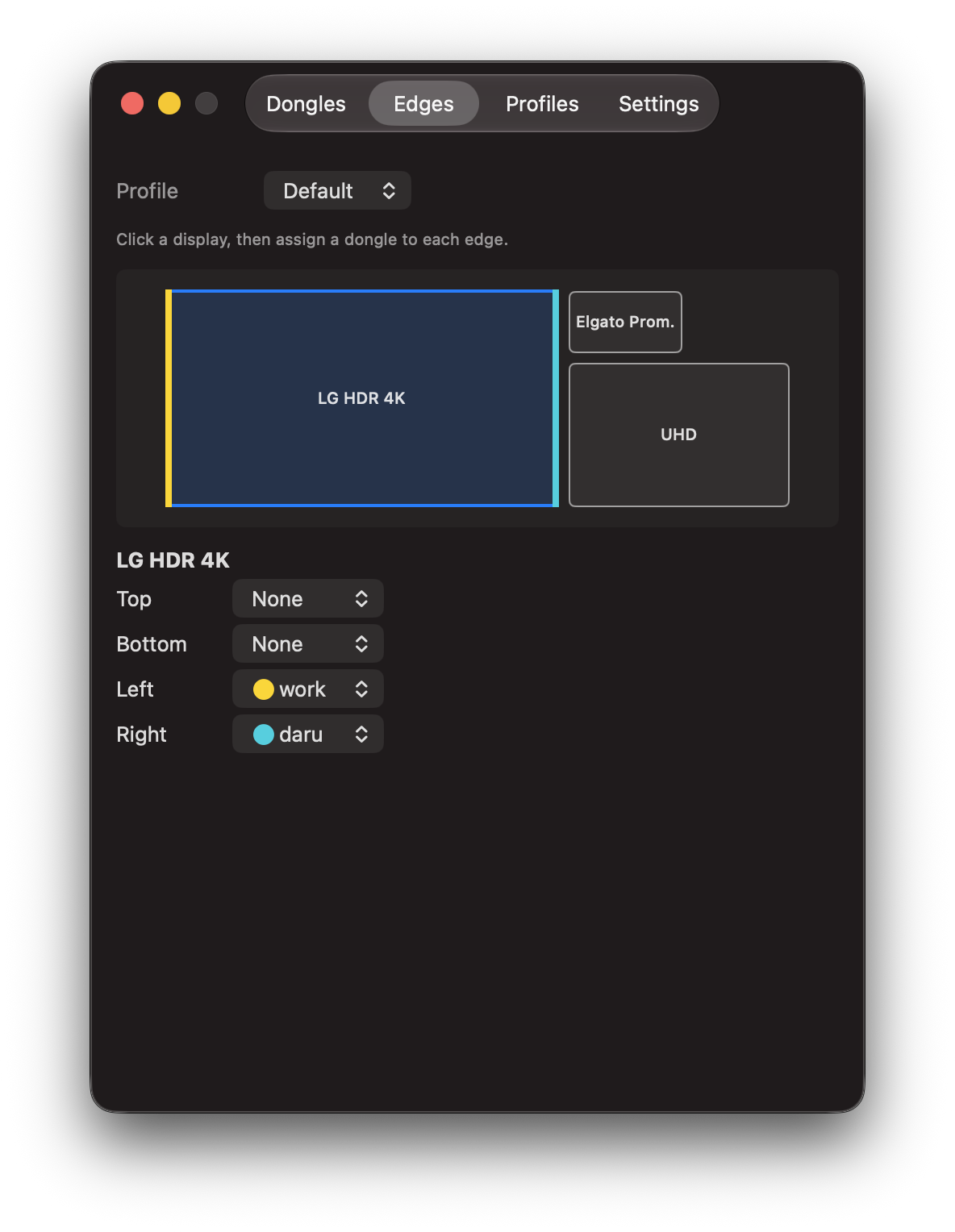
Bind a dongle to any usable edge on any Mac display. Cross it and TargetFlow grabs the controls. Shared display edges are handled because monitors love making geometry everyone's problem.
TargetFlow · macOS + Windows input switcher
Push your pointer through a screen edge and your keyboard and mouse take over another computer. Push back and you're home.
TargetFlow now runs as the controlling host on macOS or Windows. Either way, the target computer gets an ordinary USB keyboard and mouse - no app, network, or account. It still uses Bluetooth to talk to TargetDongle, because physics remains stubbornly employed.
Exactly the way we like it.
TargetFlow watches the screen edges you choose. Cross one and it sends your keyboard, mouse, scroll wheel, and media keys over Bluetooth LE to a TargetDongle.
The dongle plugs into the other computer and speaks plain USB HID. Windows, Linux, another Mac, a locked-down work machine—if it accepts a USB keyboard and mouse, it gets the input.
Bind a dongle to any usable edge on any Mac display. Cross it and TargetFlow grabs the controls. Shared display edges are handled because monitors love making geometry everyone's problem.
Connect multiple dongles, name them, color-code them, tune pointer speed, and assign each to a different edge. Per-dongle settings cover invert-scroll, Option/Command swap for PC keyboards, and independent left/right AltGr. Click Identify if “which tiny board is this?” becomes a real question.
Keep separate edge layouts for work, gaming, or whatever your rack of suspicious computers is doing. Profiles can run a shell hook, send a key chord, or fire a macro on activation - macros use a DuckyScript-flavored scripting language, with a safety stop for runaway scripts.
TargetFlow runs as the controlling host on Windows too, not just macOS. Same edge-crossing trick, same TargetDongle hardware, same nothing required on the target computer.
An in-app Firmware tab detects a Pico or Pico 2 W in flashing mode and flashes the bundled firmware directly - no dragging a UF2 onto a mounted drive, and firmware now survives future auto-updates instead of only living in the original download.
Control-Option-Command-V types your Mac clipboard into the active target. It is not clipboard sync. It is a keyboard typing very quickly while the network remains gloriously uninvolved.
Game consoles, smart TVs, streaming boxes—anything that supports a USB keyboard and mouse can be a target. Computers do not have a monopoly on needing buttons pushed.
TargetFlow requires TargetDongle hardware: a Raspberry Pi Pico W or Pico 2 W plugged into each computer you want to control. The ready-to-flash firmware is included in the download.
TargetFlow needs Accessibility permission and may need Input Monitoring so it can capture your keyboard and mouse. It lives in the menu bar and skips the Dock, where it would only loiter.
The macOS build checks for updates on its own - use Check for Updates, or let it check quietly in the background. The Windows build doesn't have auto-updates yet; re-download the installer above when a new one ships.